Java Database Programming - Using forms to Add, Modify, Delete, and Search

Some basic rules:

  1. Try to match the component on the form to the data type. 
  2. If a field will have a pre-determined number of valid values, and this list of values is unlikely to change, then use JComboBox with the editable property set to false, and the values entered into the code itself (via forms editor interface). This prevents the user from entering invalid data while preserving screen space. Examples:
  3. If a field will have a pre-determined number of valid values, and this list of values is likely to change, then use JComboBox with the editable property set to true, and the load the values from a database table. This allows the user to access a list of existing values while giving them the opportunity to enter a value that is not in the list. Examples might be:
  4. If you are loading a JComboBox from a database table, then you can do this from a method called by the JFrames/JDialog's constructor and/or "Component shown" event for the combobox. You need to remember that loading the combo could take a second or two.

Basic Structure of your program

Creating a new database record from data on a form.


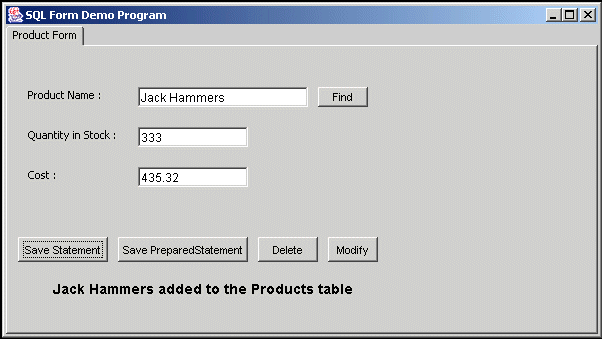
Example1 - Inserting a new product into the products table using a PreparedStatement object.

Products table:


Code:

    private void saveButtonActionPerformed(java.awt.event.ActionEvent evt) {
        //
        // retrieve and convert data into local variables
        //
        String name = nameField.getText();
        String strquantity = quantityField.getText();
        String strcost = costField.getText();
        short quantity = 0;;
        double cost = 0;
        try{
          quantity = Short.parseShort(strquantity);
        }
        catch(NumberFormatException e)
        {
         messageLabel.setText("Invalid entry in quantity field, must be a number");
         return;
        }
        try{
          cost = Double.parseDouble(strcost);
        }
        catch(NumberFormatException e)
        {
         messageLabel.setText("Invalid entry in cost field, must be a number");
         return;
        }
        //
        // test data for consistency and accuracy
        //
        if(cost < 0)
        {
         messageLabel.setText("Cost must be greater than or equal to zero");
         return;
        }
        if(quantity < 0)
        {
         messageLabel.setText("Quantity must be greater than or equal to zero");
         return;
        }
        if(name.length() <= 0)
        {
         messageLabel.setText("Name cannot be blank");
         return;
        }
        //
        //  create and execute PreparedStatement
        //

        try{
          PreparedStatement prep = con.prepareStatement("INSERT INTO products (Name, Quantity, Cost) Values(?, ?, ?)");
          prep.setString(1,name);
          prep.setShort(2,quantity);
          prep.setDouble(3,cost);
          int result = prep.executeUpdate();
          if(result == 1)
             messageLabel.setText(name+" added to the Products table");
          else
             messageLabel.setText("Unable to add "+name+" to Products table");
          prep.close(); // close the PreparedStatement
         }
         catch (SQLException e)
         {
          messageLabel.setText("Unable to add "+name+" to Products table : "+e.getMessage());
         }

   }

Example2 - Inserting a new product into the products table using a Statement object.

Note: using a PreparedStatement can be easier to create and maintain because you don't have to create a complex String addition line remembering all the single quotes and other data notation marks.

           .... same as previous example ....

        //
        //  create and execute Statement
        //
        try{
          Statement stat = con.createStatement();
         
          String sqlCommand = "INSERT INTO products (Name, Quantity, Cost) Values('" +
                               name+"',"+quantity+", "+cost+")";
          
          int result = stat.executeUpdate(sqlCommand);
          if(result == 1)
             messageLabel.setText(name+" added to the Products table");
          else
             messageLabel.setText("Unable to add "+name+" to Products table");
          stat.close(); // close the PreparedStatement
         }
         catch (SQLException e)
         {
          messageLabel.setText("Unable to add "+name+" to Products table : "+e.getMessage());
         }

    }

Locating and loading a record from a table using key field data

Example: Finding a product record using product name

  private void findButtonActionPerformed(java.awt.event.ActionEvent evt) {
     //
     // retrieve data used in search
     //
     String name = nameField.getText();
     //
     // verify data
     //
     if(name.length() <= 0)
     {
      messageLabel.setText("Name field cannot be blank");
      return;
     }
      costField.setText("");
      quantityField.setText("");
 
     //
     //  create and execute a prepared statement
     //
 
      try{
        PreparedStatement prep = con.prepareStatement("SELECT * FROM products WHERE name = ?");
        prep.setString(1, name);
        ResultSet rs = prep.executeQuery();
        if(rs.next())  // was at least one record found?
        {
         // get record data from result set into local variables
         name = rs.getString(1);
         short quantity = rs.getShort(2);
         double cost = rs.getDouble(3);
         //
         // display data onto screen
         //
         nameField.setText(name);
         quantityField.setText(""+quantity);
         costField.setText(""+cost);
         messageLabel.setText("");  // clear out message label
        }
        else
          messageLabel.setText(name+" not found in Products table");     
        prep.close();
       }
       catch(SQLException sqle)
       {
        messageLabel.setText("Error during lookup : "+sqle.getMessage());       
       }

       
    }

Deleting a record from a table using key field data

Example: Deleting a product record using product name

   private void deleteButtonActionPerformed(java.awt.event.ActionEvent evt) {
        // Add your handling code here:
     //
     // retrieve data used in search
     //
     String name = nameField.getText();
     //
     // verify data
     //
     if(name.length() <= 0)
     {
      messageLabel.setText("Name field cannot be blank");
      return;
     }
 
     //
     //  create and execute a prepared statement
     //
        try{
        PreparedStatement prep = con.prepareStatement("DELETE FROM products WHERE name = ?");
        prep.setString(1, name);
        int result = prep.executeUpdate();
        if(result == 1)  // was at least one record deleted?
        {
         //
         // clear data on screen
         //
         nameField.setText("");
         quantityField.setText("");
         costField.setText("");
         messageLabel.setText(name+" successfully deleted from products");  // clear out message label
        }
        else
          messageLabel.setText("Unable to delete "+name+" from Products table");     
        prep.close();
       }
       catch(SQLException sqle)
       {
        messageLabel.setText("Error during delete : "+sqle.getMessage());       
       }

       
    }


Modifying an existing database record from data on a form using key field data.


Example - Modifyin an existing product in the products table using a PreparedStatement object.

    private void modifyButtonActionPerformed(java.awt.event.ActionEvent evt) {
          //
        // retrieve and convert data into local variables
        //
        String name = nameField.getText();
        String strquantity = quantityField.getText();
        String strcost = costField.getText();
        short quantity = 0;;
        double cost = 0;
        try{
          quantity = Short.parseShort(strquantity);
        }
        catch(NumberFormatException e)
        {
         messageLabel.setText("Invalid entry in quantity field, must be a number");
         return;
        }
        try{
          cost = Double.parseDouble(strcost);
        }
        catch(NumberFormatException e)
        {
         messageLabel.setText("Invalid entry in cost field, must be a number");
         return;
        }
        //
        // test data for consistency and accuracy
        //
        if(cost < 0)
        {
         messageLabel.setText("Cost must be greater than or equal to zero");
         return;
        }
        if(quantity < 0)
        {
         messageLabel.setText("Quantity must be greater than or equal to zero");
         return;
        }
        if(name.length() <= 0)
        {
         messageLabel.setText("Name cannot be blank");
         return;
        }
        //
        //  create and execute a prepared statement
        //
        try{
          PreparedStatement prep = con.prepareStatement("UPDATE products SET quantity = ?, cost = ? WHERE name = ?");
          prep.setShort(1,quantity);
          prep.setDouble(2,cost);
          prep.setString(3, name);
          int result = prep.executeUpdate();
          if(result == 1)
             messageLabel.setText(name+" modified in Products table");
          else
             messageLabel.setText("Unable to modify "+name+" in Products table");
          prep.close(); // close the PreparedStatement
         }
         catch (SQLException e)
         {
          messageLabel.setText("Unable to modify "+name+" in Products table : "+e.getMessage());
         }

    }

Finding records using non key data 

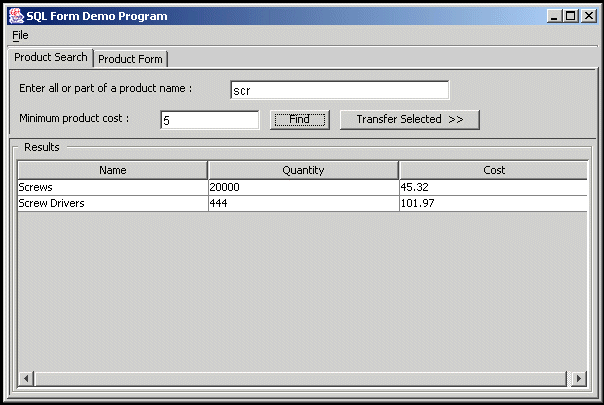
Example : Use JTable in a JSplitPane to perform searchs on the Product table


  private void nonKeyFindButtonActionPerformed(java.awt.event.ActionEvent evt) {
     //
     // retrieve data used in search
     //
     String strcost = minCostField.getText();
     String name = partialNameField.getText();
     double cost = 0;
     try{
       cost = Double.parseDouble(strcost);
     }
     catch(NumberFormatException e)
     {
      cost = 0.0;
      minCostField.setText("0.0");
     }
     name = name.trim();
     //
     //  create and execute a prepared statement
     //
 
      try{
         PreparedStatement prep = con.prepareStatement("SELECT * FROM Products WHERE name like ? AND cost > ? ");
        prep.setString(1, name+"%");
        prep.setDouble(2, cost);
        ResultSet rs = prep.executeQuery();
   
    DefaultTableModel tm = (DefaultTableModel)resultTable.getModel();
        tm.setRowCount(0);  // clear the table
        int rows = 0;
        while(rs.next())
        {
         rows = rows+1;
         tm.setRowCount(rows);
         resultTable.setValueAt(rs.getString("name"),rows-1,0);  // put name in column 0
         resultTable.setValueAt(rs.getString("quantity"),rows-1,1);  // put qry in column 1
         resultTable.setValueAt(rs.getString("cost"),rows-1,2);  // put name in column 2
        }
 
        prep.close();
       }
       catch(SQLException sqle)
       {
        messageLabel.setText("Error during lookup : "+sqle.getMessage());       
       }
    }

Transfering data from a search screen to a form


   private void transferButtonActionPerformed(java.awt.event.ActionEvent evt) {
        // Add your handling code here:
        int row = resultTable.getSelectedRow();  // get the selected row.
        if(row < 0)  // row selected ??
          return;
        String selectedName = resultTable.getValueAt(row,0);  // get the key data
        nameField.setText(selectedName);  // place it on the edit form
        centerTabbedPane.setSelectedIndex(1); // tell the tabbed panel to show the edit form
        findButton.doClick(); // execute the find button code from the edit form
    }