 ISM 3230 Introduction to Programming
 Chapter 6: Multiple Forms
| Chapter
6 Student Learning OBJECTIVES: |
|
Upon completion of this chapter,
you will be able to
- Create a project with multiple forms.
- Use the Show and Hide methods to display and hide forms.
- Create procedures that are accessible from multiple form modules.
- Differentiate between variables that are global to a project
and those visible only to a form.
- Use a form to create an About box.
- Add a splash screen to your project.
- Set the startup form or Sub Main to start project execution.
|
Multiple Forms
- The first form displayed in a project is the startup form
- By default, it is the first one created
- You can set startup form in Project, Properties
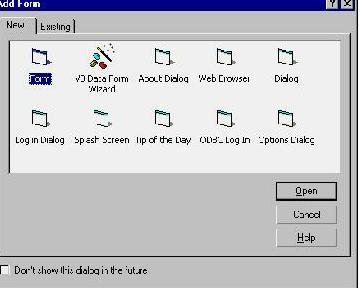
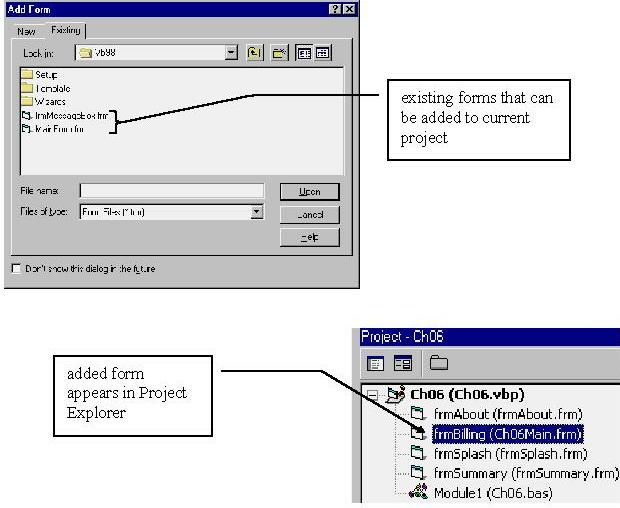
- You can add a form to project from existing form tab
Adding/Removing Forms
- Add a form to a project by selecting Add Form from the Project
menu
- Switch between forms by selecting a form in the Project Explorer window
or clicking any visible part of the form
- Add forms from other projects by selecting Add Form from the Project menu
- All the information in a form resides with the form: controls, properties,
code, variables
Hide and Show methods
- You can display or hide a form in code via the .Show
and .Hide methods, respectively
frmAbout.Show
frmAbout.Hide
- General form is formname.Show
<style>
where style can be 1 (modal) or the default value 0 (nonmodal)
- A modal form requires the user to respond to the form in some way, whereas
a modeless form does not.
- The user must respond to a Modal form and cannot click another form
in same project
- vbModal is an intrinsic
constant that you can use for modal form showing
- Normally, you make About and Summary style boxes modal (if you want),
but no others
Load and Unload statements
- You can load a form this way:
- You unload a form this way:
Show vs. Load
- When you execute the Show method, the form is loaded, if necessary, activated,
and displayed.
- The converse is not true: You can load a form but not display it
until you are ready.
Form Load vs. Form Activate Events
- When a form is displayed for the first time, two events are triggered:
- Form_Load calls the
form into memory
- Form_Activate makes
form the active form (after load event)
- Each subsequent time the form is displayed, the Form_Activate event triggers,
but the Form_Load event occurs only once—when the form is first loaded
- Thus, if you want something to occur each time a form is displayed, then
you should put that code in the form activate event, not the form
load event. The form load event occurs only (typically) once, but activate
occurs each time the form gets control.
- The only time you might load a form is when you want to display it later
at a different time.
For example:
- An example of the preceding is centering the form. If you want a form to
always be centered, then place the code in the Activate event.
Otherwise, the user can change its position if you place the centering code
in the Load event, or set a forms StartUpPosition property to centered.
- WARNING: if you want a control on a form to get the focus, you cannot
place code such as txtLastName.Setfocus
in the form_load
event unless you show the form prior to setting a control's focus.
In other words, you can do this to set the focus in the form load event:
me.show
txtLastName.Setfocus
- The Me keyword refers, always, to the currently active form:
Unload Me
Me.Hide
Referring to Other Forms’ Objects
- The code in one form cannot "see" objects in other forms
- To reference: FormName!ObjectName.property
- Thus, you can refer to txtName in
another form called frmSummary
this way:
frmSummary!txtName = …
or frmSummary!txtName.Font.Name = ...
- This implies that control names are unique within a form but need not be
unique across forms.
Standard Code Modules (SCM)
You place in the Standard Code Module (SCM) any procedures or variables referenced
by more than one form.
- The SCM has the extension .BAS
- To create a SCM:
- Select Project, Add Module
- SCM modules do not have any event procedures because SCM has no events
to which it can react. The SCM only has code and procedures.
Public
- Public procedures are "visible" to all forms
- Public variables are visible to all forms
- Though you could place Public procedures in a form for other forms to access,
it is bad practice.
- DIM variables in the code module are visible to all procedures in the module,
but not to procedures in the form modules.
- The Private statement is rarely used, because
that is the default (for "Dim")
Variables and Constants in Multi-form Projects
- Scope of variables:
- Local: available inside a procedure
- Static: inside procedure, but remembered
- Module level: available anywhere in a form
- Global: available across forms--anywhere
- Variable prefix naming conventions: m for module, g for global
- Scope a variable as narrowly as possible
Global Variables
- Global variables are declared with Public
- Though you can declare global variables anywhere, convention dictates that
public variables be placed only in the standard code module.
- Examples of global and module level declarations in a SCM:
Public gcurTotalSalary as Currency 'global variable
Public Const gcurTAX_RATE as Single = .082 'global
constant
Dim mcurMySalary as Currency 'module-only variable
- If a procedure were to contain a variable declared locally whose name is
the same as a global variable (a violation of unwritten convention for variable
naming), then the local variable takes precedence. A local variable,
when in scope, always preempts use of a global variable.
- In general, avoid global variables
Static Variables
- Static variables are local to a procedure but retain their value for the
life of a project. They are often used inside a procedure that counts things
and must maintain that count. Static variables are initialized once only.
Thereafter they are not initialized during the project:
Private Sub Something()
Static intCount as Integer 'initialized to 0 once
intCount = intCount + 1 'remembered across invocations
···
End Sub
Variable Declaration Guidelines:
- Put all local declarations at the beginning of a procedure
- Use named constants for any values that don't change
- Keep scope as narrow as possible
- Use static vs. module level if values need to be saved but only in one procedure
- Pass local variables as arguments to other called procedures, rather than
using module-level declarations.
- Pass information between forms through assignment statements if possible,
rather than using global variable declarations.
- If global variables are needed, declare them only in the Standard Code Module.
An About Box
- Acts like a Windows Help|About box
- Often displays information about the programmers, designers, and so on
- An about box is simply a modal form with an OK button and label boxes
displaying information
- You can use VB’s About Dialog template
Here’s an example "About" box
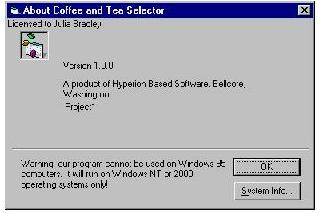
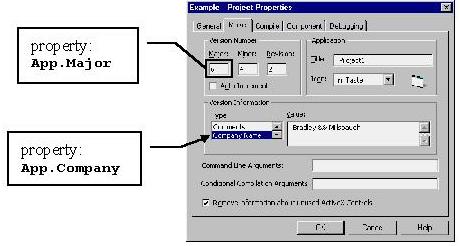
The VB About Dialog box template makes use of the Project's properties. If
you carefully fill them in, you can access the properties as variables:
A Splash Screen
- Splash screen displays while product loads
- To create:
- Select Project, Add Form, then select Splash Screen
- Splash screen loads first instead of main form
- Place splash screen load statement in Sub Main procedure in Standard Code
Module
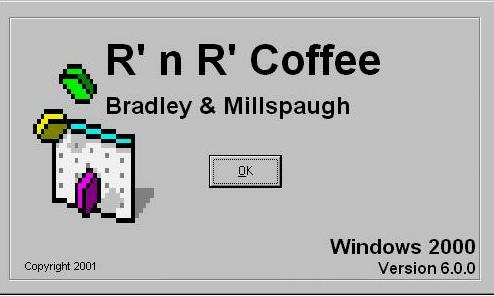
- A standard way to display a splash screen while the main form is loading
is to place the splash screen display statement (Show) and the main form load
statement (Load) in the specially named Main sub procedure located in the
Standard Code Module:
Private Sub Main()
frmSplash.Show 'load and display splash screen
Load frmMain 'load but don't display main form
End Sub
- The splash screen should have an OK button whose event procedure unloads
the splash screen and loads the main form:
Private Sub cmdClose_Click()
Unload me 'unload the splash screen
frmMain.Show 'show the main form
End Sub
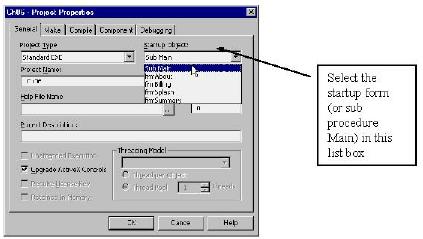
Setting the Startup Form
- By default, the first form you create in a project is the startup form
- You can set the startup form in the Project Properties menu (Project menu)
- Note that a project need not have any forms if you use a Standard
Code Module with a Main sub procedure that does calculations and displays
answers in a message box (MsgBox).
Hands on Programming Example
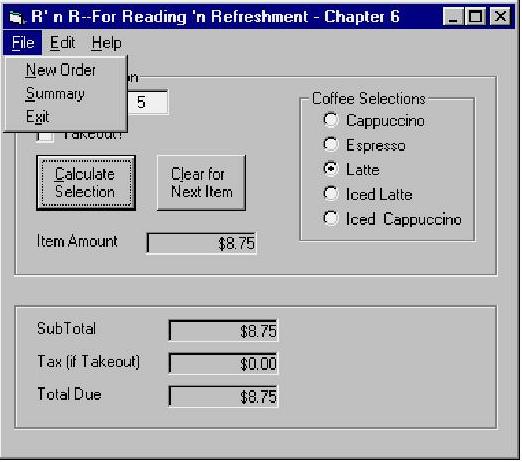
- Programming example is a multi-form Coffee Sales example with these forms:
- Splash screen
- Main form
- Summary form
- About box
- Main form called from splash screen
Programming Hints
- The startup form by default is the first form you created in the
project.
- You change the startup form by executing Tools|Options and click the Project
tab. Dropdown the list for Startup Form and select the correct startup
form name.
- Add a form to a project via File|Add File and then select the form (.frm)
to be added to the project
- To load a form maximized, select the WindowState form property and set it
to 2-Maximized.
- F4 accesses the property window; F7 accesses the Code window
- Clicking a form's Close button halts execution
- Projects can have an unlimited number of forms
- In design time, close extra windows to maximize your view of form
Chapter Summary:
|
PROPERTIES
|
|
METHODS
|
|
STATEMENTS
|
|
KEYWORDS
|
|
ControlBox
|
|
Hide
|
|
Load
|
|
Me
|
|
MinButton
|
|
Show
|
|
Unload
|
|
|
|
MaxButton
|
|
|
|
Public
|
|
|
|
WindowState
|
|
|
|
Public Const
|
|
|
| |
|
|
|
Static
|
|
|